Laptop leasing for business means paying a fixed monthly fee to use laptops for a set term, often 36 months, instead of buying them upfront. Depending on the contract, the fee covers financing alone or a full service: warranty, setup, security and end-of-life handling. This guide explains how business laptop leasing works, when it beats buying, how leases are accounted for, and what to check before signing.
What is laptop leasing for business?
Laptop leasing for business is a contract in which a lessor buys the laptops and lets a company use them for a fixed term against monthly payments. The company does not own the devices during the term. At the end, it returns, renews or buys them, depending on the lease structure. Many contracts also bundle IT services such as warranty, setup and support.
The lease is signed by the company, not by employees, and usually covers a whole fleet rather than a single device. New laptops can be added as the team grows, generally under the same framework agreement, so each hire does not trigger a separate purchase decision.
Leasing, rental and Device as a Service: what's the difference?
In everyday use, laptop leasing and laptop rental describe the same thing: a monthly fee to use devices for a set period. Strictly speaking, rental often refers to short, flexible terms with little commitment, while leasing refers to a fixed multi-year contract. Device as a Service (DaaS) goes further by bundling services into the lease: setup, device management, support and end-of-life handling.
Short-term rental suits temporary needs such as events, trainings or seasonal staff, but the monthly cost per device is higher. A financing-only lease, offered by banks and specialist lessors, lowers the upfront cost but leaves setup, repairs and disposal to the company. DaaS is the model most growing companies compare when they want to remove both the upfront cost and the operational work.
Which lease structure suits laptops?
Two structures dominate equipment leasing. A fair market value (FMV) lease has lower monthly payments and lets you return, renew or buy the devices at their market value at the end of the term. A $1 buyout lease works like a loan: payments are higher, and you own the equipment for a nominal sum at the end. For laptops, which lose value quickly, FMV structures are the usual choice.
| Fair market value (FMV) lease | $1 buyout lease | |
|---|---|---|
| Monthly payment | Lower | Higher, close to financing 100% of the price |
| End of term | Return, renew or buy at market value | You own the equipment |
| Residual value risk | Carried by the lessor | Carried by the company |
| Typical classification | Operating lease | Capital (finance) lease |
| Fit for laptops | Good, avoids owning obsolete devices | Better for equipment kept well beyond the term |
Lenovo Financial Services describes the FMV structure as the one with the lowest monthly payment, while the $1 option finances the full cost of the equipment. Industry guidance published by Healthcare Finance News adds that short-lived technology is a natural fit for FMV leases, precisely because the lessee avoids being left with obsolete hardware.
Lease or buy: which is better for business laptops?
Leasing is usually the better fit when a company hires steadily, wants predictable IT spend and renews laptops every three years. Buying makes more sense when headcount is stable, devices are kept five years or more, and an internal IT team already handles setup, repairs and disposal. The decision comes down to cash, refresh cycle and who carries the operational work.
| Full-service lease (DaaS) | Financing-only lease | Buying | |
|---|---|---|---|
| Upfront cost | Low or none | Sometimes a deposit | Full price upfront |
| Warranty and repairs | Usually included for the whole term | Depends on the contract | Manufacturer warranty, then your cost |
| Setup and MDM enrolment | Usually included | Not included | Not included |
| Delivery to remote employees | Often handled by the provider | Not included | Your own logistics |
| End of life | Collection, data wiping, refurbishment | Return to the lessor | Your responsibility |
| Ownership | Lessor | Lessor, option to buy | Company |
Cash flow and budget predictability
Buying means paying the full price on day one; leasing spreads it into fixed monthly payments. Atelier Katanga, a creative studio, used to spend €10,000 to €15,000 to equip five or six employees with high-performance laptops before moving to a monthly fee. For a company that is hiring, that cash stays available for salaries, product or marketing, and the IT budget becomes easy to forecast.
Leasing also changes how the spend is booked. Instead of a capital expenditure depreciated over several years, payments are generally treated as an operating expense, which simplifies budgeting by headcount. Read our guide on moving from Capex to Opex.
Scaling follows the same logic. Each new hire adds a line to the monthly bill rather than a purchase order, and the setup can differ by role: a powerful machine for a developer, a lightweight one for a sales rep.
Refresh cycle, security updates and obsolescence
A business laptop stays secure as long as the manufacturer ships updates, and stays fully performant for about three years of daily use. After that, unpatched vulnerabilities, slowdowns and worn batteries pile up. A 36-month lease aligns renewal with this window, so the fleet is replaced before it becomes a security or productivity problem, without the company handling disposal itself.
Operating system updates patch security vulnerabilities: a device that no longer receives them becomes an entry point for attacks. Microsoft, for instance, ended Windows 10 support on 14 October 2025, and Windows 11 requires a TPM 2.0 chip that some older laptops lack. With a mobile device management (MDM) tool, updates are pushed remotely and the compliance of each device is tracked.
Hardware wear follows a similar curve. Apple states that MacBook batteries are designed to retain up to 80% of their original capacity at 1,000 complete charge cycles, which is roughly four years for a device charged every working day.
Which companies benefit most from leasing?
Laptop leasing benefits companies that hire regularly, run distributed teams or need recent, high-performance hardware: startups and scale-ups, tech and creative studios, and multi-site businesses. Within a company, the benefits spread across several teams, because the same contract touches procurement, IT operations, onboarding and the finance plan, not just the IT budget.
IT teams gain a single process for ordering, MDM enrolment, tracking and device recovery. HR teams can make sure every new hire receives a configured laptop before day one. Finance teams get predictable costs and visibility on each monthly fee, and procurement teams deal with one contract instead of several suppliers.
Restaurants and retail are a specific case: tablets, laptops and screens must keep running during service, so repair and replacement speed matter more than the device itself. See our guide to IT equipment leasing for restaurants and our Restaurants & Retail page.
Buying still wins in some cases: a small, stable team that keeps laptops for five years or more, specialised hardware a lessor won't stock, or a company with an in-house IT team and an existing disposal process.
How are laptop leases treated in accounting and tax?
Under IFRS 16, most leases go on the balance sheet as a right-of-use asset and a lease liability, but lessees can choose to expense leases of low-value assets, and computers are cited as an example. US GAAP (ASC 842) has no equivalent low-value exemption. For tax, lease payments are generally deductible as operating expenses, while bought laptops are depreciated. Rules vary by country.
The IFRS 16 standard does not set a fixed threshold, but its basis for conclusions refers to assets worth around USD 5,000 or less when new, and the election can be made lease by lease. Most business laptops fall below that level, so many IFRS reporters book laptop lease payments as a straight-line expense. Leases of 12 months or less can also be expensed under the short-term exemption.
Companies reporting under US GAAP generally recognise laptop leases on the balance sheet, since ASC 842 does not offer the low-value exemption that IFRS 16 does. Smaller companies applying local GAAP often keep a simpler treatment, with lease payments recorded as rent.
Tax rules differ by jurisdiction and company status. Bought laptops are recorded as fixed assets and depreciated over several years, while lease payments are usually deducted in the year they are paid. Check the treatment that applies to your company with your accountant.
Companies that already own their fleet can still move to a monthly model through a leaseback: they sell their current devices to a lessor and rent them back, freeing up cash without disrupting their teams.
What should you check before signing a laptop lease?
Compare offers on total cost over the full term, not on the monthly fee alone. Check what the fee includes (warranty, repairs, setup, support), whether a deposit is required, how damage and wear are charged at return, what happens when an employee leaves mid-term, and how data is erased when devices come back. These terms often matter more than a few euros on the monthly price.
Deposits vary widely: some lessors ask for one or several months upfront, others only the first payment. Return conditions deserve the same attention, since normal wear, missing chargers or a damaged screen can be billed at the end of the term. Early termination clauses decide what happens when a team shrinks, and the framework agreement decides whether new laptops can be added on the same terms.
Setup is the other hidden cost. A laptop that arrives blank still has to be enrolled in your device management tool, configured with your apps and security policies, and assigned to an employee. Zero-touch enrolment through Apple Business Manager or Windows Autopilot removes most of that work if the lessor supports it.
Leasing laptops for remote and international teams
Equipping employees in several countries adds constraints that a single-country lease ignores: customs declarations, import duties and VAT, local keyboard layouts, power plugs and warranty coverage that may not apply abroad. The simplest setups source devices locally in each country, ship them pre-configured to the employee's home, and keep every device in a single inventory regardless of location.
Before signing, ask the provider in which countries it can deliver, from where devices ship, who handles customs paperwork, and how repairs and returns work outside your home market. Ask the same question for offboarding: collecting a laptop from a former employee abroad is often harder than delivering it.
End of term and sustainability
At the end of a laptop lease, a company typically has three options: renew with recent models, buy the devices at their residual value, or return them. Returned laptops are wiped, then refurbished, resold, donated or recycled by the lessor. Ask for a certificate of data erasure for each device, ideally following a recognised standard such as NIST SP 800-88.
Leasing keeps devices in use for longer overall: a laptop returned after three years can serve a second user once refurbished, and some lessors offer refurbished laptops from the start of the contract. Learn more about sustainable IT equipment leasing.
Which laptop for which profile?
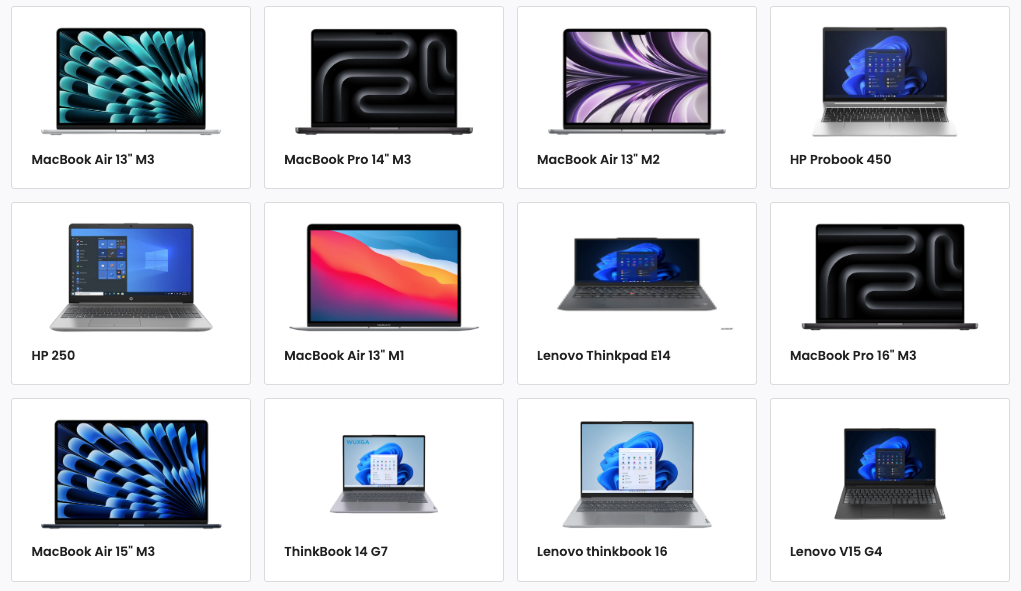
The right laptop depends on the job: computing power for developers, an accurate screen and a good graphics chip for designers, light weight and long battery life for people on the move. Choosing by profile avoids overspending on standard roles and under-equipping technical ones, two mistakes that add up over a 36-month lease.
| Profile | Priorities | Recommended setup |
|---|---|---|
| Developers | CPU, memory for containers and virtual machines | 16 GB RAM minimum, 32 GB for heavy workloads; MacBook Pro or Lenovo ThinkPads |
| Designers and video | Colour-accurate screen, graphics | 16 to 32 GB RAM, high-resolution display; Apple MacBooks (Pro range) |
| Sales and field teams | Weight, battery life, connectivity | Under 1.4 kg, all-day battery; MacBook Air, ThinkPad X1 Carbon, Microsoft Surface Laptop |
| Ops, HR, finance | Office apps, video calls | 16 GB RAM, standard setup; MacBook Air, Dell Laptops or HP EliteBook |
On a lease, several setups can sit on the same contract, and models can change at renewal if an employee changes role. Hesitating between Apple models? Read MacBook Air or MacBook Pro and our guide to leasing a MacBook Pro for your business, or browse the catalogue.
Checklist: comparing business laptop lease offers
Use this list to compare two or three laptop leasing offers on the same basis. Each point covers a cost or a task that one provider may include in the monthly fee and another may bill separately or leave to your team. Ask for the answers in writing before signing, as they rarely appear on a price list.
- Total cost over the full term, including any deposit, setup and end-of-term fees
- Lease structure (FMV or buyout) and the price of buying the devices at the end
- Warranty length, repair turnaround and whether a replacement device is provided
- Setup and enrolment in your MDM before delivery, including zero-touch support
- Countries covered for delivery, returns and repairs
- Rules for adding devices, transferring them between employees and ending early
- Return conditions and how wear and damage are charged
- Data erasure certificates and what happens to devices after return
Lease and manage your business laptops with Fleet
Picking the right setup for each role, enrolling every laptop in your MDM before it ships, delivering to employees in several countries, then wiping and collecting devices at the end of the term: each step can be handled in-house or across several suppliers, but each one adds time, risk and cost.
Fleet runs laptop leasing end to end in one platform, across 150+ countries, from the first order to the device's second life:
- Catalogue: choose from 200+ products, including Macs, PCs, phones and tablets, new or refurbished, in Fleet's catalogue through Fleet's IT equipment leasing offer.
- Ready on day one: laptops arrive pre-configured through zero-touch enrollment (Apple Business Manager or your MDM), so employees are operational from their first day.
- Delivery in 150+ countries: Fleet sources laptops from local suppliers, so devices skip customs and import fees and reach employees in 3 to 5 working days, with a 95% perfect order rate. See global procurement.
- Warranty and repairs: 100% warranty coverage, repairs and a loaner device included for the whole contract.
- Budget: a fixed monthly subscription with no upfront investment, with IT costs moved to OPEX.
- Renewal and second life: laptops are renewed every 3 years, and Fleet handles their second life, including donations.
Start now · Book a demo and see how Fleet equips your teams with the right laptops, wherever they work.
FAQ
How much does it cost to lease a laptop for business?
The monthly price depends on the model, the term length, the lease structure and the services included. An FMV lease costs less per month than a buyout lease, and a full-service lease costs more than financing alone but removes setup, repair and disposal costs. Compare offers on total cost over the full term rather than on the monthly fee.
Is there a deposit to lease a business laptop?
It depends on the provider. Some lessors ask for one or several months of payments upfront, especially for young companies, while others only charge the first monthly payment. Check this point before signing, as it changes the real upfront cost.
Can a startup or small business lease laptops?
Yes. Lessors run a credit check before approving a lease, and very young companies may face stricter conditions, such as a deposit or a shorter list of eligible models. Many providers target startups and small businesses specifically, since they are the companies most likely to avoid large upfront purchases.
What happens if a leased laptop is lost, stolen or damaged?
The contract decides who pays. Accidental damage is often covered by the warranty or an insurance option, while loss and theft may be billed to the company unless an insurance clause covers them. With an MDM tool, a lost laptop can be locked or wiped remotely to protect company data.
Can employees keep their leased laptop when they leave?
Not by default, as the device belongs to the lessor. The company usually collects it and reassigns it to another employee, or buys it out if it wants to let the departing employee keep it.
Conclusion
Laptop leasing for business replaces a large upfront purchase with a predictable monthly cost and, in its full-service form, moves setup, repairs and end-of-life handling to the provider. The right offer is the one with the lowest total cost over the term once deposits, return conditions, international delivery and data erasure are taken into account.
See how Fleet handles this in practice
200+ devices, sourced locally and delivered pre-configured to 150 countries — buy or lease, same price.